Choosing the right AWS compute service is a foundational decision that directly impacts your application's performance, scalability, and monthly cloud spend. A misstep can lead to wasted budget, poor performance, and significant technical debt. The right choice, however, establishes a resilient and cost-effective foundation for business growth.
This guide provides a clear, actionable framework for navigating the AWS compute ecosystem, helping you make strategic infrastructure decisions that drive tangible business results.
Why Your AWS Compute Service Choice Matters
Selecting a compute service is like choosing an engine for a vehicle. You wouldn't use a freight truck for a quick grocery run, nor would you haul commercial freight in a compact car. Each engine is designed for a specific purpose; using the right one saves time, fuel, and operational headaches.
Similarly, AWS compute services are the engines that power your applications. Your choice determines your ability to handle traffic spikes, manage customer demand, and control costs. A fintech platform processing thousands of transactions per second requires a different engine than a SaaS startup aiming for viral growth. A smart initial choice prevents costly migrations and future operational challenges.

The Core Engine Analogy for AWS Compute
At the heart of AWS compute are two fundamentally different models, which can be viewed as distinct engine types. Understanding this distinction is the first step toward making an informed decision.
Amazon EC2 (The Conventional Engine): This is your powerful, reliable workhorse. It provides a virtual server with raw, consistent power. You have complete control over the operating system, software, and configuration. EC2 is ideal for steady, predictable workloads like monolithic applications or large databases that must run 24/7. However, you are responsible for all maintenance and pay for the resource even when it's idle.
AWS Lambda (The Hybrid Engine): This is the modern, hyper-efficient hybrid model. The engine runs only when triggered by an event—an API call, a file upload, or a database change. You manage only the code, not the underlying server. This "serverless" approach is perfect for short, event-driven tasks. Because it's serverless, you never pay for idle time, leading to significant cost efficiency.
Understanding the core difference between provisioned servers (EC2) and on-demand functions (Lambda) is the key to unlocking the full potential of AWS compute. This fundamental concept underpins the entire family of specialized services.
This knowledge is critical for building a cloud foundation that supports, rather than hinders, your business goals. At Group107, we apply these principles daily. See them in action in our guide to enterprise cloud migration strategy.
A Breakdown of Core AWS Compute Options
Navigating the landscape of AWS compute services can feel overwhelming. To simplify, it's helpful to group them by function. Some services offer raw server power, while others are designed to manage entire application ecosystems.
We'll break down the most critical options, from basic virtual servers to serverless functions and container orchestration. Each service solves a different business problem, and the most effective solutions often involve a strategic combination of them.
Amazon EC2: The Virtual Server Workhorse
Amazon Elastic Compute Cloud (EC2) is the cornerstone of AWS compute. An EC2 instance is essentially your own virtual server in the cloud. You select the operating system, memory, and CPU power, giving you total control over the environment. This granular control makes EC2 exceptionally versatile.
Business Use Cases for EC2:
- Legacy Applications: "Lifting and shifting" an application from an on-premise data center is often most straightforward with EC2, as you can replicate your existing environment.
- Predictable Workloads: For databases, web servers, or monolithic applications with consistent 24/7 demand, EC2’s steady performance is ideal.
- Custom Software: When you need to install specific software or require a highly customized operating system, EC2 provides the necessary control.
Real-World Example: A large e-commerce company would likely run its core product database on a powerful, memory-optimized EC2 instance. This guarantees stable, high-speed performance for its retail platform, effortlessly handling inventory updates and order processing. The trade-off is the operational overhead of managing everything, from security patching to scaling.
AWS Lambda: The Serverless Function Executor
AWS Lambda revolutionizes the server model. With Lambda, you don't provision or manage servers. You upload your code, and it runs in response to triggers—an API call, a file upload to an S3 bucket, or a database update.
The primary business value of Lambda is its cost efficiency and scalability. You pay only for the compute time you use, measured in milliseconds. If your code isn't running, you aren't paying. This eliminates costs associated with idle capacity.
This event-driven, serverless approach is a game-changer for many scenarios. It delivers massive cost savings and scales automatically for sporadic or unpredictable workloads. For instance, a SaaS platform can use Lambda to process a user's profile picture or send a welcome email. These tasks are intermittent, making a dedicated server wasteful. Lambda executes the function and scales down to zero, awaiting the next event.
Amazon ECS and EKS: Container Orchestration at Scale
Modern applications are increasingly built using containers—lightweight, self-contained packages that bundle everything an application needs to run. Managing thousands of containers manually is not feasible. This is where container orchestration services like Amazon Elastic Container Service (ECS) and Amazon Elastic Kubernetes Service (EKS) become essential.
- Amazon ECS is AWS's native container orchestration service. Its deep integration with the AWS ecosystem simplifies adoption for teams already invested in AWS.
- Amazon EKS provides a managed service for Kubernetes, the open-source industry standard for container orchestration. It's the ideal choice for teams prioritizing multi-cloud portability or leveraging existing Kubernetes expertise.
Both services automate the deployment, scaling, and health management of containerized applications.
Real-World Example: A fintech company might run its microservices-based trading platform on EKS. Each service—user authentication, trade execution, market data—runs in a separate container. EKS ensures all services are running, healthy, and scaled appropriately to handle volatile market activity.
AWS Fargate: The Serverless Compute Engine for Containers
AWS Fargate offers a powerful middle ground, blending serverless efficiency with container technology. It allows you to run containers with either ECS or EKS without managing the underlying EC2 instances. You package your application, specify its CPU and memory requirements, and Fargate handles the rest.
Fargate combines the portability of containers with the operational ease of serverless. It's perfect for teams that want to use containers but wish to avoid the overhead of managing a server cluster.
Real-World Example: A digital marketing agency could use Fargate to host its clients' websites. Each site runs in an isolated container, scaling independently without the agency's DevOps team worrying about server patching or cluster capacity.
How to Select the Right AWS Compute Service
Choosing the right AWS compute service is a critical architectural decision. It’s a choice that shapes your application's cost, performance, and scalability for years to come.
To begin, analyze your application's architecture. Is it a monolithic application with steady traffic, or is it composed of event-driven microservices with unpredictable demand? This initial assessment will immediately narrow your options.
The following decision tree provides a visual guide for this crucial first step.
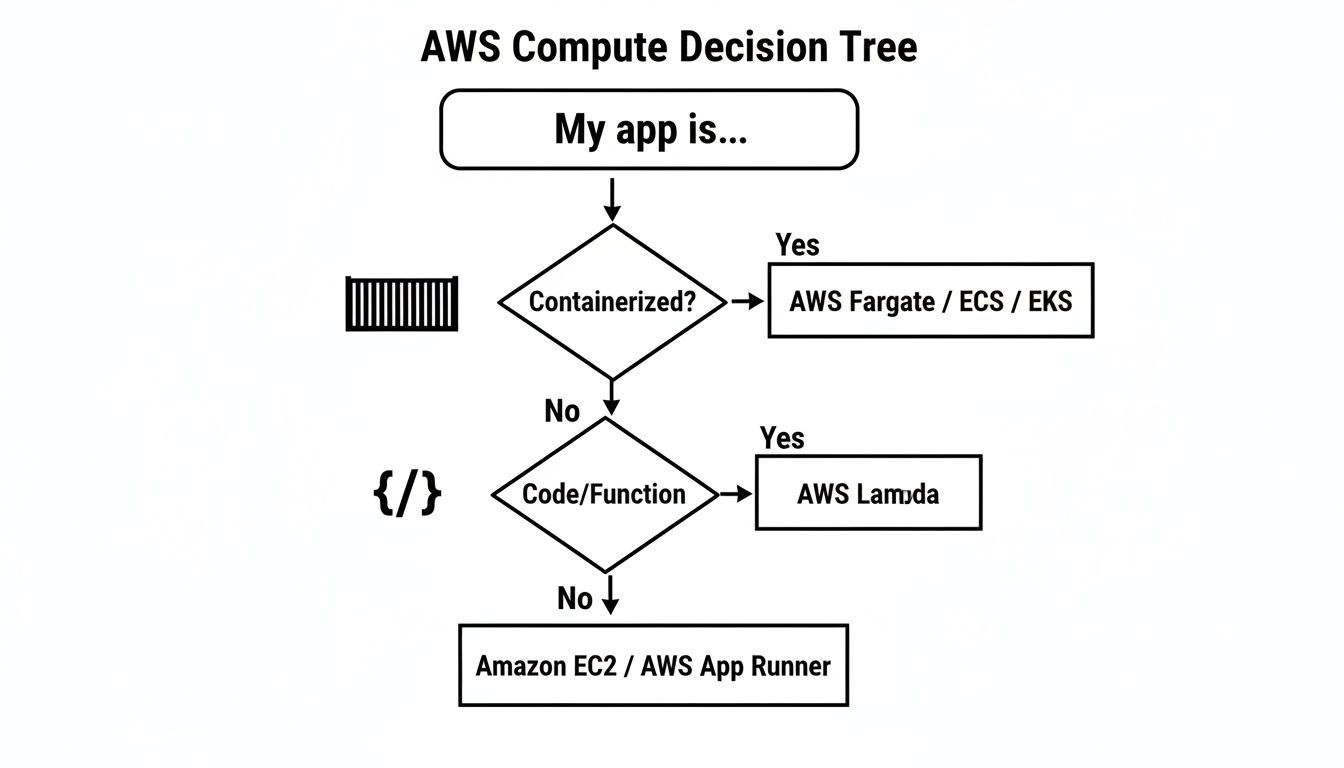
As the flowchart shows, your application's packaging is a primary determinant. Containerized applications point toward Fargate, ECS, or EKS. Function-based code points to Lambda. This highlights how architecture directly influences your compute choice.
A Framework for Making Your Decision
To move from a general direction to a specific service, use this five-point framework. Each question helps you evaluate the trade-offs between control, cost, and operational effort.
- Application Architecture: Is your application a large monolith or a collection of microservices? Monoliths are often a good fit for EC2. Microservices are better suited for containers (ECS, EKS, Fargate) or functions (Lambda).
- Operational Overhead: How much time can your team dedicate to managing servers? Serverless options like Lambda and Fargate offload all infrastructure management to AWS. In contrast, EC2 offers full control but requires your team to manage everything.
- Scalability Needs: Is your traffic predictable or volatile? For sudden, massive spikes—like a flash sale or viral marketing campaign—the automatic, near-instant scaling of Lambda and Fargate is invaluable.
- Cost Model: Do you prefer a predictable monthly bill or a pay-as-you-go model that mirrors actual usage? EC2 with Reserved Instances offers cost certainty, while Lambda's per-millisecond billing ensures you never pay for idle resources.
- Team Skill Set: What skills does your team possess? If you have Kubernetes experts, EKS is a natural fit. If your team is new to the cloud and needs to move quickly, the simplicity of Fargate can significantly reduce time-to-market.
For new businesses building on the cloud, making the right choice from day one is a huge competitive advantage. You can find more expert advice on this topic in guides on how to build a SaaS product.
AWS Compute Service Comparison Matrix
This table provides a quick-reference comparison of the core services, breaking down their primary use cases, management models, and ideal user profiles.
| Service | Primary Use Case | Management Model | Scalability | Ideal For |
|---|---|---|---|---|
| EC2 | General-purpose computing, legacy apps | IaaS (You manage OS & runtime) | Manual or Auto Scaling Groups | Teams needing full control or migrating on-prem apps |
| Lambda | Event-driven code execution | Serverless (AWS manages everything) | Automatic, scales to zero | Microservices, data processing, backend tasks |
| Fargate | Serverless containers | Serverless (AWS manages underlying nodes) | Automatic, per-container | Containerized apps without managing clusters |
| ECS | Container orchestration | PaaS/IaaS (You can manage nodes) | Cluster & service-level scaling | Teams who want a simple way to run containers on AWS |
| EKS | Managed Kubernetes | PaaS/IaaS (AWS manages control plane) | Cluster & pod-level scaling | Teams already using Kubernetes or wanting its ecosystem |
| Elastic Beanstalk | Web app deployment | PaaS (AWS manages platform) | Automatic, configurable | Developers wanting to quickly deploy apps without IaC |
This matrix illustrates the spectrum from complete control (EC2) to complete abstraction (Lambda). Your ideal service depends on the specific business and technical requirements you've just evaluated.
Scenario-Based Selection
Let's apply this framework to real-world business scenarios. There is no single "best" service—only the best service for a specific job.
Scenario 1: The Fintech Startup
A fintech startup building a payment processing API requires high security and low latency. For this use case, AWS Fargate is an excellent choice. It provides the strong isolation of containers and robust network controls without the complexity of managing a Kubernetes cluster. This allows a small team to focus on shipping code rather than managing infrastructure.
Scenario 2: The E-commerce Platform
An e-commerce platform preparing for a Black Friday sale can leverage AWS Lambda. By offloading tasks like order processing and inventory updates to Lambda functions, the platform can handle millions of events without impacting the core user experience. After the sale, the system scales down to zero, and so do the costs.
Scenario 3: The Government Agency
A government agency migrating a legacy internal application to the cloud might choose Amazon EC2. A "lift-and-shift" approach allows them to move the application as-is, replicating their on-premise environment with minimal code changes. This serves as a practical first step in a broader enterprise cloud migration strategy, delivering a quick win before undertaking a full modernization.
Optimizing Your Compute Costs and Performance
Selecting the right AWS compute service is the first step. The real business value is unlocked through continuous cost management and performance optimization—a practice known as FinOps. This transforms your cloud spend from a mere expense into a strategic asset for driving efficiency and growth.

Effective FinOps provides visibility and predictability over your AWS bill, ensuring every dollar spent on compute power generates business value.
Actionable AWS Cost Management Strategies
Relying solely on On-Demand pricing is the most expensive way to run your infrastructure. To significantly reduce your EC2 spend, implement a blended pricing model that combines the following purchasing options.
A Checklist for a Blended Pricing Model:
- [ ] Use AWS Savings Plans: Commit to a specific amount of compute usage (per hour) over a 1- or 3-year term to receive discounts of up to 72%. Savings Plans are highly flexible and automatically apply to EC2, Fargate, and Lambda usage. They are ideal for covering your consistent, baseline usage.
- [ ] Use Reserved Instances (RIs): For workloads that are always on and completely predictable, like a production database, RIs offer discounts similar to Savings Plans (up to 72%). You commit to a specific instance family in a specific region.
- [ ] Use Spot Instances: Access unused EC2 capacity at discounts of up to 90% off On-Demand prices. The trade-off is that AWS can reclaim the instance with a two-minute warning. This makes Spot Instances perfect for fault-tolerant workloads like big data analysis, CI/CD pipelines, or batch processing.
By blending these models, you can build a highly cost-efficient foundation. Use RIs for your predictable baseline, cover variable workloads with Savings Plans, and run interruptible tasks on Spot Instances to maximize savings.
For a deeper dive, explore our expert guide on cloud cost optimization strategies.
Boosting Performance Through Right-Sizing and Scaling
Cost savings are only one part of the equation; performance is the other. A common and costly mistake is over-provisioning—paying for compute power you don't use. The solution is right-sizing.
Right-sizing involves using tools like Amazon CloudWatch to analyze your application's actual CPU and memory utilization. You then select an instance size that matches these real-world needs, not an initial guess. For example, moving a workload from an m5.2xlarge to an m5.xlarge after data analysis can cut compute costs in half with zero performance impact.
The other key is intelligent auto-scaling. Configure Auto Scaling Groups to automatically add or remove servers based on real-time metrics.
Best Practices for Auto-Scaling:
- Use Target Tracking: Set a target for a key metric, like an average CPU utilization of 60%, and let AWS manage the scaling actions.
- Implement Scheduled Scaling: If you have predictable traffic patterns (e.g., higher during business hours), schedule your environment to scale up before the rush and scale down afterward.
- Combine with Spot Fleets: Integrate Spot Instances into your Auto Scaling Groups to absorb peak demand at a fraction of the cost of On-Demand instances.
At Group107, we consistently help clients achieve 30-40% cost reductions by implementing these dynamic right-sizing and scaling policies. This builds a disciplined, efficient operation that delivers the right performance at the right time, without wasted spend.
Best Practices for Security and Compliance
Cloud security is a shared responsibility between AWS and you. Getting this partnership right is critical, especially in regulated industries like finance and healthcare, where a minor misconfiguration can have major consequences. Robust security for your AWS compute services is the bedrock of customer trust and operational stability.
The AWS Shared Responsibility Model clarifies these roles: AWS is responsible for the security of the cloud (physical data centers, hardware, core network), while you are responsible for security in the cloud (data encryption, access management, network configuration).
Implement the Principle of Least Privilege with IAM
Your most effective defense is controlling who can do what. The Principle of Least Privilege dictates that a user or service should only be granted the minimum permissions necessary to perform its function. This practice dramatically reduces your attack surface.
Actionable Steps for IAM:
- Use IAM Roles: Never hard-code credentials in your application code. Instead, assign an Identity and Access Management (IAM) role to your EC2 instances or Lambda functions. This allows them to securely obtain temporary credentials to access other AWS services.
- Define Granular Policies: Be specific. If a Lambda function only needs to write files to a single S3 bucket, its IAM policy should explicitly deny it from reading, deleting, or even listing other buckets.
- Regularly Audit Permissions: Use tools like AWS IAM Access Analyzer to identify and remove excessive or unused permissions.
Secure Your Network Perimeter with VPCs
Your Virtual Private Cloud (VPC) is your private, isolated section of the AWS cloud. Failing to secure its entry and exit points is like leaving your data center's front door unlocked. Use these two services in tandem to create a layered defense.
- Network Access Control Lists (NACLs): These act as a stateless firewall at the subnet level. Use NACLs for broad-stroke rules, such as blocking traffic from known malicious IP ranges.
- Security Groups: These act as a stateful firewall for individual instances. Define precisely what traffic is allowed. For example, a web server's security group should only permit inbound traffic on port 443 (HTTPS) from the internet.
Encrypt Data at Rest and in Transit
Protect your data at all times. AWS integrates encryption directly into its services, making it easy to implement.
- Data at Rest: Encrypt data stored on disks, such as Amazon EBS volumes attached to EC2 instances. Always enable encryption on EBS volumes using the AWS Key Management Service (KMS). It’s a simple configuration that renders data unreadable if a volume is ever compromised.
- Data in Transit: Encrypt data moving between services or between users and your application. Enforce TLS/SSL everywhere to prevent eavesdropping and man-in-the-middle attacks.
Mastering these fundamentals creates a secure foundation. To go deeper, review our guide on common cloud computing security risks.
The Future of Cloud Compute and AWS Innovation
The future of cloud computing is being shaped by two powerful forces: the rapid advancement of artificial intelligence (AI) and the growing demand for edge computing. AWS is not just participating in these trends; it is building the core infrastructure that defines them.

AWS's strategic investments underscore this commitment, with plans for capital expenditures projected to hit $200 billion in 2026. This massive investment is geared toward building the next generation of application infrastructure. You can find more detail on AWS's strategic spending on eSparkinfo.
Powering the AI and Machine Learning Revolution
AI is no longer a niche technology; it's a core driver of business value, from hyper-personalization in SaaS to complex financial modeling. However, standard CPUs often struggle with the massive calculations required for modern AI models.
To address this, AWS developed custom silicon designed specifically for these workloads:
- EC2 Inf-series Instances (Inferentia): These chips are optimized for machine learning inference—running trained models in production. They deliver high-performance, low-cost predictions for real-time applications.
- Trn1 Instances (Trainium): These chips are designed for model training. They provide a more cost-effective solution for training large-scale deep learning models compared to general-purpose hardware.
This custom hardware makes AI more accessible and affordable. A fintech startup can train fraud detection models faster, or an e-commerce platform can deploy a more intelligent recommendation engine. These tools directly connect technological advancement to business ROI. We help companies apply these exact tools with our AI for small businesses solutions.
Bringing Compute to the Edge
Not all workloads belong in a centralized data center. Edge computing pushes compute resources closer to where data is generated and consumed, enabling applications that require near-instantaneous response times.
For applications like real-time analytics, augmented reality, and IoT device control, the latency of a round-trip to a distant cloud region is unacceptable.
AWS is extending its infrastructure to meet this need with services designed to operate at the edge:
- AWS Outposts: This service provides a rack of AWS hardware that runs in your own data center. You get the same AWS services and APIs on-premises, which is ideal for workloads with data residency requirements or ultra-low latency needs.
- AWS Local Zones: These are extensions of an AWS Region located in major metropolitan areas. They provide a high-bandwidth connection to the main region while enabling single-digit millisecond latency for applications serving users in that geographic area.
For a gaming company, this means a lag-free player experience. For a manufacturer, it enables real-time processing of data from factory floor sensors. Edge computing unlocks new application categories that were previously impossible.
Answering Your AWS Compute Questions
Here are direct, actionable answers to the most common questions we hear from both startups and enterprise teams about AWS compute services.
EC2 vs. Lambda vs. Fargate: What’s the Real Difference?
Think of it as a spectrum from total control to total convenience.
Amazon EC2 (Total Control): You get a virtual server—a blank slate. You manage the OS, patches, and all software. Use it for migrating existing applications or for steady, predictable workloads.
AWS Lambda (Total Convenience): You provide your code, and AWS handles everything else. It's event-driven and you only pay when it runs. It's perfect for stateless, short-running tasks like image processing or API backends.
AWS Fargate (The Middle Ground): It's serverless for containers. You package your application in a container, and Fargate runs it without you managing the underlying servers. It offers the portability of containers with the operational ease of serverless.
As a Startup, How Do I Keep Early AWS Compute Costs From Spiraling?
For a startup, cash flow is paramount. The key is to adopt a serverless-first mindset and pay only for what you use.
Start with AWS Lambda and Fargate. Their main advantage is zero cost for idle time. If your application has no users, you pay nothing for compute. This is a lifesaver for new products with unpredictable traffic.
When you do need a server, consider EC2's T-series "burstable" instances. They provide a low-cost performance baseline with the ability to handle traffic spikes. Most importantly, configure AWS Budgets and cost alerts from day one as a non-negotiable financial safety net.
How Hard Is It to Move an On-Premise Application to AWS?
The difficulty depends on your migration strategy. The "lift-and-shift" approach is the fastest way to start. You replicate your on-premise environment on EC2 instances, moving your application to the cloud with minimal changes.
While fast, this approach doesn't unlock the full benefits of the cloud.
A more powerful, long-term strategy is to refactor your application. This involves redesigning components to leverage cloud-native services—breaking down a monolith into microservices on EKS or converting functions into Lambda tasks. It requires more upfront effort but results in a truly scalable, resilient, and cost-efficient application.
Summary and Next Steps
Choosing the right AWS compute service is a strategic decision that directly impacts your business's agility, scalability, and profitability. By aligning your choice with your application architecture, operational capacity, and cost model, you can build a powerful and efficient cloud foundation.
Your Actionable Next Steps:
- Assess Your Workload: Analyze your application's architecture (monolith vs. microservices) and traffic patterns (predictable vs. sporadic) to determine the best-fit compute model.
- Implement a Blended Cost Strategy: Combine AWS Savings Plans, Reserved Instances, and Spot Instances to optimize your cloud spend. Start by setting up AWS Budgets to gain visibility and control.
- Prioritize Security from Day One: Implement the principle of least privilege using IAM, configure your VPC network security, and enable encryption for data at rest and in transit.
- Embrace Continuous Optimization: Regularly review your usage with tools like AWS Cost Explorer and CloudWatch to right-size your resources and refine your scaling policies.
By taking these practical steps, you can harness the full power of AWS compute to drive innovation, improve performance, and achieve your business objectives.
Group107 has extensive experience assessing applications and guiding companies through the most effective cloud strategies for their business goals. Learn how we can help you turn your vision into delivery at scale by visiting https://group107.com.