
ADA website compliance is a core business function, not an optional feature. The Americans with Disabilities Act (ADA) extends beyond physical storefronts to your digital presence, mandating that your website must be accessible to people with disabilities.
While the law isn’t a technical manual, U.S. courts and the Department of Justice (DOJ) consistently point to a single gold standard: the Web Content Accessibility Guidelines (WCAG). For any business operating online, WCAG is the definitive rulebook for implementing digital accessibility and mitigating legal risk.
More Than a Legal Checkbox: A Strategic Advantage
Viewing ADA compliance as a mere legal hurdle is a significant business misstep. Integrating accessibility into your digital strategy is a powerful driver for growth, risk management, and brand enhancement. It’s about gaining a tangible competitive edge, not just avoiding litigation. For companies in SaaS, finance, and e-commerce, an accessible platform is a critical component for maximizing market share.
An inaccessible website is equivalent to hanging a “closed for business” sign for millions of potential customers. The global population of people with disabilities holds significant spending power. Ignoring this demographic directly impacts revenue and creates a clear opportunity for your competitors.
The Pillars of ADA Website Compliance
To fully grasp the scope, it’s essential to understand the core concepts defining digital compliance. This framework moves beyond legal jargon to provide a strategic blueprint for building a more inclusive and successful business.
| Compliance Pillar | What It Means for Your Business | Strategic Impact |
|---|---|---|
| Legal Mandate (ADA) | The ADA is a civil rights law requiring “places of public accommodation” to be accessible. Courts consistently rule that websites fall into this category. | Avoids costly lawsuits, DOJ investigations, and negative press, protecting your bottom line. |
| Technical Standard (WCAG) | WCAG provides specific, testable success criteria for creating accessible digital experiences, from color contrast to keyboard navigation. | Gives your development team a clear, actionable roadmap for building and maintaining an accessible site or app. |
| Business Opportunity | Accessibility opens your digital doors to a massive, underserved market segment and improves the user experience for everyone. | Increases market share, boosts brand loyalty, improves SEO, and enhances overall user engagement and conversions. |
| Ethical Imperative | It’s about building a digital world where everyone, regardless of ability, has equal access to information, services, and opportunities. | Strengthens corporate social responsibility, fosters an inclusive company culture, and builds authentic customer trust. |
These pillars are interconnected. Fulfilling the legal and technical requirements unlocks the business and ethical benefits, transforming a compliance task into a genuine growth engine.
The Tangible Business Benefits
Viewing compliance through a strategic lens reveals high-impact benefits that directly contribute to your bottom line.
- Expanded Market Reach: A fully accessible website welcomes over one billion people globally who live with a disability. This includes the rapidly growing senior population, who often face similar online barriers.
- Enhanced Brand Reputation: A commitment to accessibility signals your company’s values. It demonstrates a focus on diversity, equity, and inclusion (DEI), building deep trust and loyalty with customers who align with socially responsible brands.
- Improved User Experience for All: Accessible design principles make a website better for every user. Clear navigation, readable text, and a logical layout reduce friction, boosting engagement and conversions across all demographics.
- Strengthened SEO Performance: Many WCAG requirements overlap with SEO best practices. Proper heading structures, descriptive image alt text, and clear link text are all signals that search engines favor, leading to better rankings and more organic traffic.
By reframing the conversation from compliance to opportunity, organizations can unlock significant value. Accessibility is not a feature; it is a fundamental component of a modern digital strategy that ensures everyone can engage with your brand.
Ultimately, a commitment to accessibility for all is one of the smartest risk management strategies a business can adopt. Proactive implementation protects you from expensive litigation while building a more robust, inclusive, and profitable digital presence.
The Legal Risk is Real and Growing
Ignoring website accessibility is a high-stakes gamble with severe financial consequences. What was once an abstract legal concept has become a harsh business reality, and companies that delay digital accessibility are facing a rising tide of litigation.
The data is clear. The explosion in ADA website lawsuits shows that in the first half of one year, U.S. courts saw 2,014 new filings—a 37% increase from the previous year. At this rate, the annual total will exceed 4,000 cases, indicating an accelerating trend. You can explore the state-by-state ADA lawsuit data to understand the full scope.
The surge is driven by a consistent legal interpretation: courts increasingly treat websites as “places of public accommodation” under Title III of the ADA. This means your digital presence has a legal duty to provide an equal experience to every user, regardless of their ability.
The DOJ Is Sending Clear Signals
The Department of Justice (DOJ) has put any ambiguity to rest. Its official guidance confirms the ADA applies to all online services, goods, and information. While a specific technical standard for private companies has not been mandated by the DOJ under Title III, its recent actions under Title II provide a clear roadmap.
The most significant signal is the new final rule under ADA Title II, which legally requires state and local government websites to meet WCAG 2.1 Level AA standards. This is the first time a federal regulation has established a binding technical benchmark for digital accessibility.
For private businesses, this is a clear indicator. The U.S. government has officially endorsed WCAG as the de facto standard. It provides a clear roadmap for where Title III enforcement is headed, making proactive adoption a critical risk management strategy.
Demand Letters and the High Cost of Waiting
For most businesses, legal trouble begins not with a lawsuit but with a demand letter. Sent from law firms representing a plaintiff, these letters allege your website has barriers violating the ADA and present an ultimatum: remediate the site and pay their legal fees, or face litigation.
Fighting these claims is expensive, which is why most businesses—from SMBs to large enterprises—choose to settle.
- Financial Drain: A typical settlement ranges from $5,000 to over $20,000, excluding the cost of remediation and your own legal fees.
- Reputational Damage: A lawsuit is public and can generate negative press, eroding customer trust and positioning your brand as non-inclusive.
- Operational Disruption: Legal threats divert your team’s time, focus, and budget away from core business growth activities.
This has created a cottage industry for opportunistic plaintiffs, especially in states like New York, Florida, and California. Waiting for a demand letter is a reactive, stressful, and costly strategy. The only sustainable path forward is to invest in a robust accessibility plan before one arrives.
Breaking Down the WCAG Accessibility Principles
While the ADA establishes the legal “what,” the Web Content Accessibility Guidelines (WCAG) provide the technical “how.” Instead of viewing WCAG as an intimidating checklist, it’s more effective to understand its foundation: four core principles that answer the question, “What makes a website accessible?”
These principles form the acronym POUR: Perceivable, Operable, Understandable, and Robust. When your teams—from developers and designers to content creators—internalize these concepts, the mindset shifts from a grudging technical task to a user-focused mission.

This framework translates abstract principles into actionable goals with real-world applications.
The POUR Principles in Practice
| Principle (POUR) | Core Goal | Practical Example | Common Failure |
|---|---|---|---|
| Perceivable | Can everyone see, hear, or otherwise perceive your content? | Image alt text describes a product photo for someone using a screen reader. | A marketing video auto-plays with no captions, making it useless for someone who is hard of hearing. |
| Operable | Can everyone interact with your site’s navigation and controls? | A user can navigate the entire checkout process, including dropdown menus and date pickers, using only their keyboard. | A pop-up appears that can only be closed by clicking a tiny “X” with a mouse, trapping keyboard users. |
| Understandable | Is your content and navigation clear, predictable, and easy to comprehend? | Error messages on a form are specific and helpful, like “Please enter a valid email address.” | A button simply labeled “Submit” is used for three different actions across the site, causing confusion. |
| Robust | Does your site work reliably across different browsers and assistive tech? | Your website’s code is clean and follows HTML standards, allowing a screen reader to correctly identify headings and links. | Using non-standard code for a “button” makes it appear as plain text to assistive tech, so it can’t be used. |
Let’s explore each principle in more detail.
Principle 1: Perceivable
This principle focuses on sensory input. Content cannot be invisible to a user’s senses. If information is presented visually, there must be an auditory or tactile alternative. The goal is to offer information in multiple formats so it can be processed through different channels.
- Alt Text for Images: Descriptive alt text provides a textual alternative to an image, allowing a screen reader to convey its meaning to a user who cannot see it.
- Captions for Videos: For users who are deaf or hard of hearing, captions are non-negotiable, providing a text version of all audio content.
- Color Contrast: Text must have sufficient contrast against its background to be readable for users with low vision or color blindness.
Principle 2: Operable
Operable means a user can navigate and interact with every component on your site. The interface cannot demand an action that a user is physically unable to perform. This principle is focused on providing multiple paths for interaction.
A site isn’t truly operable if a user gets stuck in a “keyboard trap”—an element they can tab into but can’t tab out of without a mouse. This common mistake renders entire sections of a site completely useless.
- Keyboard Accessibility: All interactive elements—links, buttons, forms, menus—must be fully functional using only a keyboard.
- Sufficient Time: Users need enough time to read and act. Auto-playing carousels or forms that time out aggressively create significant barriers.
- No Seizure Triggers: A site must not contain content that flashes more than three times per second, a critical health and safety requirement.
Principle 3: Understandable
This principle is about clarity and predictability. It’s not enough for users to perceive and operate your site; they must also be able to comprehend it. This is where accessibility intersects with user experience (UX). Vague button labels, confusing navigation, and inconsistent layouts all violate this principle.
Clear and consistent design is the bedrock for meeting this standard. For a more detailed look, explore our guide on web accessibility best practices.
Principle 4: Robust
Robust means your website’s code must be clean and standards-compliant enough to be interpreted reliably by a wide variety of browsers, devices, and assistive technologies—both now and in the future. This technical principle is about building on a solid foundation of valid HTML and using ARIA (Accessible Rich Internet Applications) attributes correctly. When code is clean, a screen reader knows a button is a button, ensuring a dependable experience for all users.
Common Accessibility Failures and Their Human Impact
While the principles are clear, their implementation is often lacking. Most websites are rife with digital roadblocks that are more than just technical glitches—they are real-world barriers that prevent people from accessing services, purchasing products, or consuming information.

The scale of the problem is staggering. A recent analysis found that 94.8% of the top one million home pages fail to meet basic WCAG 2 standards, with an average of 51 detectable accessibility errors per page. The full WebAIM Million report reveals over 50 million distinct barriers across the web’s most visited sites alone.
Let’s connect these technical ada website compliance requirements to their impact on actual users.
Low-Contrast Text
This is the most common accessibility failure. Light gray text on a white background or text placed over a busy image might look aesthetically pleasing to a designer but creates a usability nightmare.
- The Technical Failure: The color contrast ratio between the text and its background falls below WCAG AA standards.
- The Human Impact: For a user with low vision or color blindness, this text is effectively invisible. Your call-to-action, pricing, or navigation disappears, resulting in a lost customer.
Missing Alternative Text for Images
Every meaningful image—from product shots to infographics—requires descriptive alt text. This short HTML description explains what an image shows and its purpose.
If an image contains information, that information must be available as text. Otherwise, your visual content is meaningless to a significant portion of your audience.
When alt text is missing, a screen reader can only announce “image” or read a nonsensical file name, leaving a potential customer completely in the dark.
Ambiguous Links and Unlabeled Forms
Clear, predictable signposts are essential for website navigation. Poorly labeled links and forms create a broken experience for anyone using assistive technology.
- Empty or Vague Links: Links labeled “Click Here” or “Learn More” provide zero context to a screen reader user navigating a list of links. This turns your site into a confusing maze.
- Unlabeled Form Fields: This is a complete dead end. If a form field for a name or email lacks a programmatic label, a screen reader cannot tell the user what to input. They are blocked from signing up, logging in, or completing a purchase.
These barriers also apply to downloadable documents. It is equally important to ensure PDFs are tagged correctly, a topic we cover in our guide to the AccessibleDocs WordPress plugin for inclusive PDFs.
Framing these issues as major roadblocks instead of minor bugs is the first step toward building a truly inclusive digital presence.
Your Roadmap to Achieving and Maintaining Compliance
Understanding ADA website compliance requirements is the first step; implementing them requires a clear, actionable roadmap. This framework guides your product and engineering teams through a structured process, ensuring accessibility becomes an integral part of your company culture, not a one-off project.
A successful compliance journey is a program of continuous improvement built on four distinct phases: Audit, Remediate, Integrate, and Monitor.
Phase 1: Audit and Assess
You cannot fix what you don’t know is broken. A thorough accessibility audit is the foundation of your entire strategy, combining automated tools with expert human testing to provide the data needed to move forward.
- Automated Scanning Tools: Use tools like WAVE, axe, or Siteimprove to crawl your website and identify common issues like missing alt text, obvious contrast errors, and empty links.
- Manual and Assistive Technology Testing: This is where you gain real insight. Automated tools can only detect about 30% of WCAG issues. Expert testers must navigate your site using only a keyboard and screen readers (like JAWS or NVDA) to uncover the critical barriers automated scans miss.
The output is a comprehensive audit report detailing every WCAG violation, its location, and its impact on users. This document becomes your remediation blueprint.
Phase 2: Prioritize and Remediate
With a detailed audit report, the next step is systematic remediation. Smart prioritization is key to making progress without derailing your development sprints.
Build a remediation backlog sorted by severity:
- Critical Blockers: Address issues that prevent users from completing core tasks, such as checkout or form submission. These are fixed first.
- High-Impact Issues: Tackle problems that seriously degrade the user experience but may not be total dead ends, like inaccessible navigation or uncaptioned videos.
- Minor Issues: Fix frustrating but manageable problems, such as inconsistent heading structures or minor contrast failures on non-essential text.
Integrate these tasks into your existing development workflows, treating accessibility fixes with the same priority as other bugs to make the process predictable and manageable.
Phase 3: Integrate and Train
Fixing past mistakes is reactive; preventing future ones is proactive. This phase is about embedding accessibility into your team’s DNA through a “shift-left” approach, considering accessibility from the very beginning of the product lifecycle.
- Update Your “Definition of Done”: Add an accessibility checkpoint to every user story. A feature is not “done” until it is accessible.
- Team Training: Provide role-specific training for designers, developers, and QA testers on accessible design principles and secure coding practices.
- Bake it into Your CI/CD Pipeline: Add automated accessibility checks to your continuous integration and deployment process to catch new issues before they go live.
This cultural shift is the most critical component of long-term success, ending the cycle of creating new accessibility debt with each product update.
Phase 4: Monitor and Maintain
Accessibility is not a “set it and forget it” project. Your website constantly changes with new content and features. Continuous monitoring is essential to prevent regression.
Maintaining compliance is an ongoing commitment. A website compliant today can become non-compliant tomorrow after a minor code push. Continuous vigilance is the only way to protect your investment and your users.
Establish a regular monitoring schedule:
- Quarterly Automated Scans: Run full-site automated scans at least quarterly to catch new, basic errors.
- Annual Manual Audits: Conduct a full manual and assistive technology audit annually or after any major redesign.
- Appoint an Accessibility Champion: Designate an individual or team to own the accessibility program, oversee the process, and promote best practices.
An effective checklist is essential. This ultimate website accessibility checklist is a valuable resource for hitting all critical success criteria. Following this four-phase roadmap allows you to build a sustainable program that not only meets ADA website compliance requirements but also delivers a superior experience for every user.
The Business Case for Digital Accessibility
Beyond legal mandates, ADA website compliance presents a significant business opportunity. A proactive accessibility strategy is an investment in new markets, a stronger brand, and a better user experience for everyone.
The most immediate benefit is a larger audience. Approximately 15% of the global population lives with some form of disability. An accessible website opens your digital doors to this massive and underserved market, creating new revenue streams that competitors who neglect accessibility cannot access.
From Compliance to Competitive Advantage
Inclusive design principles create a better website for all users. Features implemented for accessibility—such as clear navigation, high-contrast text, and a logical page structure—reduce friction and improve usability for everyone. This universal improvement boosts satisfaction, builds loyalty, and often leads to higher conversion rates.
Furthermore, a public commitment to accessibility enhances your brand reputation. It signals that your company values diversity and inclusion, building trust with socially conscious consumers and differentiating you in a crowded market.
Achieving this requires a structured approach, as outlined in this high-level compliance roadmap.
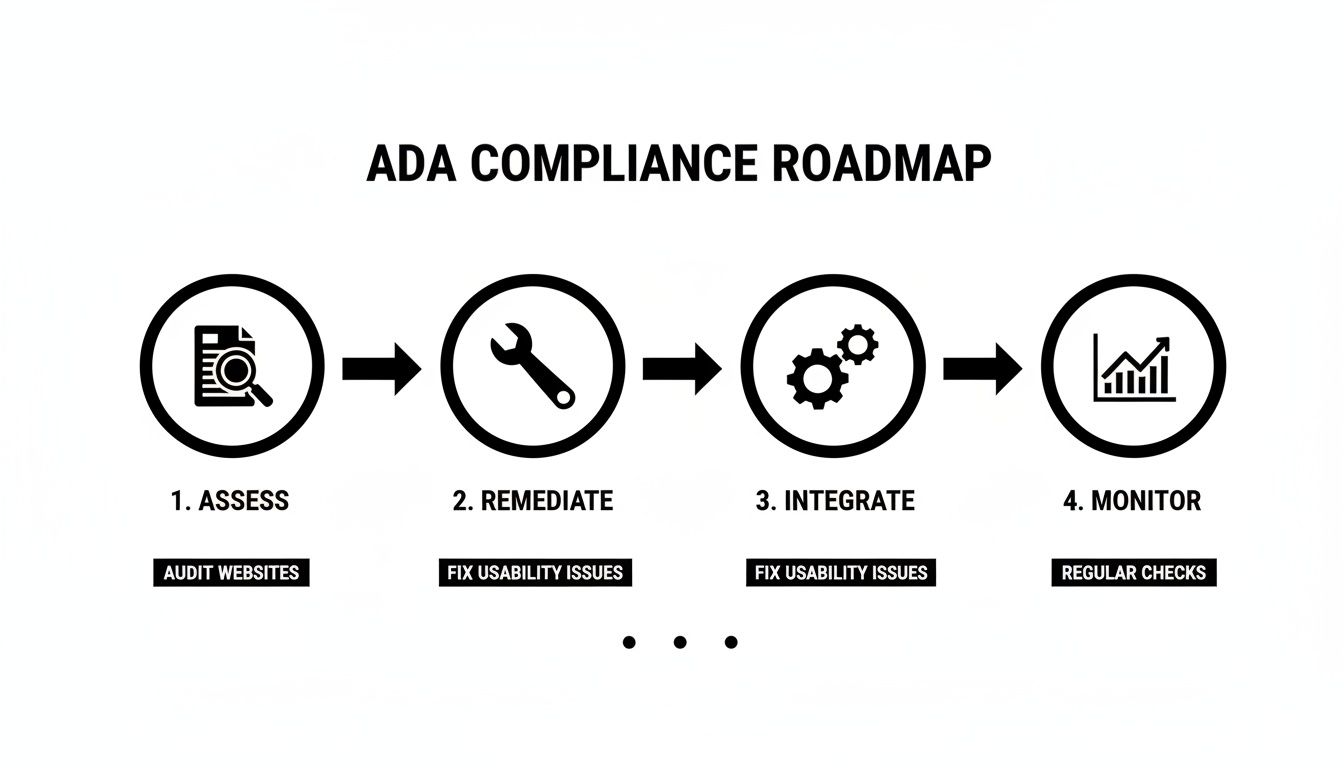
This is not a one-time project but a continuous cycle of assessment, remediation, and integration.
The Financial and Legal Imperative
Pressure for clear, enforceable standards continues to grow. A turning point was the DOJ’s final rule under Title II, mandating that state and local government websites meet WCAG 2.1 Level AA standards. This first-of-its-kind federal regulation was a direct response to widespread non-compliance, where sites in this sector averaged 51 WCAG errors.
As you can learn more about these escalating WCAG compliance requirements, it’s clear that the private sector will face similar scrutiny.
Investing in digital accessibility is smart business. It opens new revenue channels, strengthens your brand, and contributes to a more inclusive digital world. If you need expert guidance, explore our comprehensive web development services.
Answering Your Top ADA Compliance Questions
Navigating digital accessibility often brings up recurring questions. Here are clear, direct answers to the most common inquiries.
Does the ADA Apply to My Small Business Website?
Yes, it almost certainly does. The Americans with Disabilities Act does not provide an exemption for small businesses.
Title III of the ADA applies to any “place of public accommodation,” a category that courts have consistently interpreted to include commercial websites. Regardless of whether you have 15 or 1,500 employees, if your business operates online, your website must be accessible.
What’s the Difference Between ADA and WCAG?
This distinction is crucial. The ADA is the law, while WCAG is the technical standard.
- The ADA is the U.S. civil rights legislation that prohibits discrimination based on disability. It establishes the legal requirement for accessibility but does not provide technical specifications for websites.
- WCAG (Web Content Accessibility Guidelines) is the globally recognized set of technical standards that defines how to make a website accessible. The Department of Justice (DOJ) and courts reference WCAG as the benchmark for determining ADA compliance.
Can I Really Get Sued if My Site Isn’t Compliant?
Absolutely. The primary legal risk is a civil lawsuit filed by an individual who encounters an accessibility barrier on your website. These lawsuits can result in expensive settlements, significant legal fees, and a court order mandating remediation on a tight deadline. This article provides a great overview of ADA Compliant Website Requirements Made Simple.
Are Those “Accessibility Overlay” Widgets Enough to Protect Me?
No. In fact, they can create additional legal risk. These “quick-fix” widgets, which promise instant compliance via a single line of code, rarely address the underlying code issues that create barriers. They often conflict with the assistive technologies people with disabilities actually use and are increasingly cited in lawsuits as ineffective. True compliance requires building accessibility into your source code from the ground up.
At Group107, we build accessible, compliant digital experiences the right way. Our experts are ready to audit your site, guide your team through remediation, and integrate accessibility into your development process—transforming a legal requirement into a true competitive advantage. Learn more about our services.
