
Deciding between Microsoft Azure and AWS isn't just a technical choice; it's a strategic business decision that shapes your scalability, innovation potential, and long-term TCO. The core difference boils down to this: Azure shines with its deep integration into the Microsoft enterprise ecosystem and its formidable hybrid cloud capabilities, while AWS stands on its legacy as the most mature, feature-dense platform with the largest market footprint.
The right answer depends entirely on your existing infrastructure, future goals, and specific workload needs. Do you require seamless integration with on-prem Windows Server and Active Directory? Or are you looking for the most extensive, battle-tested suite of services on the market? This guide provides the clarity needed to make a confident, data-driven decision.
Choosing Your Cloud Platform: Azure vs AWS

This is a practical guide for tech leaders, CTOs, and product owners who need to make a real-world decision, moving beyond a simple feature checklist. We'll analyze the nuances that matter, whether you're a startup launching an MVP, an enterprise migrating legacy systems, or a fintech firm navigating strict compliance demands.
While AWS has long held the top spot with a commanding 30% global market share, the race is far from over. Microsoft Azure has been closing the gap, now holding between 20-25% and showing incredible growth, largely by leveraging its massive enterprise install base—a staggering 85% of Fortune 500 companies use Microsoft products.
This guide delivers a clear, outcome-focused analysis of their services, pricing, and capabilities. For a refresher on the basics, our guide on what cloud computing is and why you need it offers a helpful primer before we dive deeper.
Key Differentiators: Azure vs AWS at a Glance
Before dissecting the technical details, this high-level comparison frames the core strengths and typical use cases, helping you quickly see which provider might align better with your company's strategic direction.
| Criteria | Microsoft Azure | Amazon Web Services (AWS) |
|---|---|---|
| Primary Strength | Deep integration with Microsoft enterprise software (Office 365, Active Directory) and superior hybrid cloud solutions. | The most extensive and mature suite of cloud services, with a vast global infrastructure and a massive user community. |
| Ideal For | Enterprises heavily invested in the Microsoft stack, organizations requiring robust hybrid cloud deployments, and regulated industries like finance and government. | Startups needing rapid scalability, organizations seeking the broadest toolset, and businesses prioritizing a mature, well-documented ecosystem. |
| Market Position | Strong #2 with rapid growth, excelling in the enterprise and hybrid sectors. | Dominant market leader with the most comprehensive service portfolio and largest global reach. |
Think of Azure as the logical choice for organizations already "all-in" on Microsoft, while AWS is often the default for startups and companies that prioritize having the widest possible array of tools. Now, let's explore how these differences impact real-world implementations.
Comparing Core Services: Compute, Storage, And Networking
Every cloud architecture is built on compute, storage, and networking. When weighing Azure against AWS, getting this foundational layer right is critical. The choices made here will dictate your application's performance, data accessibility, and ultimately, your bottom line.
For architects and engineers, this isn't about ticking boxes on a feature list. It's about matching the right service to the right job—whether spinning up high-performance compute for a fintech trading platform or building a scalable storage backend for a SaaS product.
Virtual Machines: EC2 vs. Azure VMs
At a glance, virtual machines seem like a commodity, but the philosophy and ecosystem behind them are distinct.
Amazon EC2 (Elastic Compute Cloud) is the undisputed veteran. Its main advantage is the sheer variety of instance types—over 400 of them. This allows for incredible precision in matching compute power to nearly any workload, from tiny general-purpose instances to powerful bare-metal machines. The upside is unparalleled flexibility; the downside can be analysis paralysis for teams new to the platform.
Azure Virtual Machines offers a more curated and streamlined selection. While still providing ample options for major use cases, the decision-making process is simpler. Azure's real advantage is its deep integration with the Microsoft stack, especially the Azure Hybrid Benefit. This allows you to bring existing on-prem Windows Server and SQL Server licenses to the cloud, dramatically slashing costs.
Key Takeaway: For any organization heavily invested in Microsoft software, Azure VMs often come out ahead on Total Cost of Ownership (TCO). The licensing benefits and familiar management tools create a smoother, more cost-effective migration path.
Object Storage: S3 vs. Blob Storage
Modern applications depend on object storage for backups, media files, and the massive datasets that feed analytics and AI models.
AWS's Simple Storage Service (S3) is the de facto industry standard. It’s famous for its legendary 99.999999999% durability, massive scalability, and a feature set battle-hardened for over a decade. Services like S3 Intelligent-Tiering automatically move data to the most cost-effective tier, optimizing costs without manual intervention.
Azure’s answer, Blob Storage, is a powerful competitor offering the same durability and scalability with storage tiers (Hot, Cool, Archive) that mirror S3. Where Blob Storage often excels is in high-performance analytics, especially when paired with other Azure services. For example, Azure Databricks is co-engineered with Microsoft, creating deep optimizations that deliver a noticeable speed boost for data-intensive queries. This tight integration is critical for modern data platforms that rely on CI/CD pipeline automation.
Virtual Networking: VPC vs. VNet
A secure cloud architecture requires a solid, isolated network environment.
The AWS Virtual Private Cloud (VPC) is a mature and incredibly configurable solution, giving you fine-grained control over subnets, route tables, and network gateways. This power is fantastic but comes with a steep learning curve, requiring a solid grasp of networking fundamentals.
Azure Virtual Network (VNet) is often seen as more intuitive, especially for those with a traditional on-premises background. Its approach to hybrid connections feels more natural for extending an existing corporate network into the cloud, making it a compelling choice for enterprises that are migrating, not starting from scratch.
Analyzing Pricing Models And Total Cost Of Ownership

When comparing Azure vs AWS, looking at on-demand, pay-as-you-go rates is just scratching the surface. The real cost of the cloud is a deeper calculation that includes commitment discounts, easily missed fees, and unique ecosystem perks. To create an honest budget, you need to analyze the Total Cost of Ownership (TCO).
Both AWS and Azure offer sophisticated ways to slash costs for predictable, always-on workloads. However, their approaches and the resulting savings can vary wildly depending on your operational model and existing software licenses. Understanding these models is fundamental to keeping your cloud spend in check.
Commitment And Savings Plans
To move past sticker shock, AWS and Azure offer significant discounts for long-term commitments.
-
Reserved Instances (RIs): This is the classic model for both clouds. You commit to a specific instance type in a certain region for a one- or three-year term and can receive a discount of up to 72-75%. RIs are a perfect match for stable, predictable workloads, like a production database server.
-
Savings Plans: AWS introduced Savings Plans as a more flexible alternative to RIs. Instead of locking into a specific instance family, you commit to a certain dollar amount of compute spend per hour. This lets you swap instance types or even move between regions without losing your discount, making it a better fit for dynamic applications.
-
Azure Reservations: Similar to RIs, Azure Reservations extend beyond virtual machines. You can reserve capacity for SQL Database, Cosmos DB, and other services, providing a broader tool for managing costs across your entire Azure estate.
Spot Instances And Unpredictable Workloads
For workloads that can handle interruptions, such as batch processing, big data analysis, or dev/test environments, both platforms offer spare compute capacity at a massive discount—often up to 90%.
AWS calls them Spot Instances, while Azure calls them Spot Virtual Machines. The concept is the same: you bid on unused capacity, and your instance runs as long as your bid stays above the current spot price. If the market price rises, your instance may be terminated with a brief warning. This is a fantastic model for fault-tolerant applications where cost is the primary driver.
Key Takeaway: The real difference often comes down to tooling and integration. AWS has a more mature ecosystem built around Spot Instances, with tools like Spot Fleet that make it incredibly easy to manage large clusters of spot and on-demand instances together.
The Hidden Costs: Data Egress And Support
Two costs that often surprise businesses are data transfer fees and premium support.
Data leaving the cloud provider's network, or data egress, almost always incurs a fee. Inbound data is typically free, but moving terabytes of data out to the internet or back to your data center can add up quickly. The fee structures are complex and vary by region, making them difficult to forecast without detailed planning.
Additionally, the free support tiers are insufficient for serious business needs. For any mission-critical application, a paid support plan is essential. These plans can add a significant percentage to your monthly bill but provide critical access to cloud engineers and guaranteed response times. Our deep dive on cloud cost optimization strategies explores numerous ways to manage these expenses.
The Azure Hybrid Benefit: A Key Differentiator
For companies already deep in the Microsoft ecosystem, the Azure Hybrid Benefit is arguably Azure's single biggest financial advantage. This program allows you to bring existing on-premises Windows Server and SQL Server licenses (with Software Assurance) to the cloud.
In practice, this means you only pay for the raw infrastructure—not the Microsoft software licensing. For a large migration of Microsoft-based applications, this can lead to TCO savings of 40% or more compared to running the same setup on AWS. It makes Azure a compelling choice for established enterprises looking to modernize their IT without repurchasing licenses.
Evaluating Security And Compliance For Regulated Industries

In fintech, healthcare, or government, the Azure vs AWS conversation centers on security and compliance. For these sectors, a data breach is a potential company-killer. Both platforms deliver world-class security, but their philosophies and integration into existing enterprise environments are vastly different.
Both providers have all major certifications like GDPR, HIPAA, and PCI DSS covered. The real decision comes down to the nuances: how their identity management, threat detection, and governance tools align with your current security posture and specific regulatory requirements.
Identity And Access Management: The Core Divide
Cloud security starts with identity: who gets access to what? This is your first and most important line of defense.
AWS Identity and Access Management (IAM) is known for its incredible power and granularity. You can write surgically precise policies, defining exact permissions for every user, role, and resource. For a cloud-native startup, this is fantastic. The downside? For a large enterprise, managing thousands of IAM roles and policies can quickly become a massive operational headache without airtight governance from day one.
Microsoft approaches this from a different angle. Azure Active Directory (now part of Microsoft Entra ID) is already the identity system for most of the world's large businesses. If your company runs on-prem Active Directory or uses Office 365, extending that same identity fabric to Azure is nearly seamless. This creates a single, unified identity plane across your hybrid environment, drastically simplifying user management and reducing the risk of misconfiguration.
Key Takeaway: For a financial institution or public company with a deep-rooted Active Directory footprint, Azure's native identity integration is a massive strategic advantage. It reduces complexity and leverages existing investments in identity governance, making it the path of least resistance for secure cloud adoption.
Advanced Threat Detection And Governance
Beyond login credentials, both clouds offer sophisticated toolsets to monitor environments and shield them from threats.
AWS provides a powerful lineup of security services like GuardDuty for intelligent threat detection, Security Hub for a centralized compliance dashboard, and Control Tower for setting up secure, multi-account guardrails. These tools are top-notch but often feel like a collection of individual services that need to be configured and integrated.
Azure’s big play here is deep integration. Microsoft Defender for Cloud acts as a single, unified platform for security posture management and threat protection. It doesn’t just cover Azure; it extends its protective umbrella to on-premises data centers and even other clouds like AWS. This "single pane of glass" is a huge win for enterprise security operations centers (SOCs) monitoring a complex IT landscape.
This tight integration simplifies security policy enforcement across the entire application lifecycle, which is invaluable for our DevOps as a Service teams. The result is a more cohesive and manageable security framework—critical for organizations facing stringent audits.
Innovating With DevOps And AI Services
The Azure vs. AWS debate often boils down to which platform can truly accelerate innovation. Today, that acceleration comes from efficient DevOps practices and powerful, accessible AI. The choice between them hinges on their different philosophies in these critical areas.
Microsoft champions a tightly integrated, all-in-one model with Azure DevOps, while AWS provides a modular, "best-of-breed" toolkit. This pattern is mirrored in their AI offerings, each with a distinct strategy for putting machine learning into the hands of businesses.
Comparing DevOps Toolchains
A solid CI/CD pipeline is the heartbeat of modern software delivery. Both platforms provide the necessary tools, but the user experience and integration differ significantly.
Azure DevOps is a single, unified platform that packages everything a development team needs:
- Azure Boards for agile planning and tracking.
- Azure Repos for private Git repositories.
- Azure Pipelines for build, test, and deploy automation.
- Azure Test Plans for managing complex testing scenarios.
- Azure Artifacts for hosting and sharing packages.
This cohesive setup is a massive win for teams wanting a single source of truth without the headache of integrating multiple third-party tools. For organizations in the Microsoft ecosystem, the familiar interface and seamless tie-in with Azure Active Directory make it an easy choice. Understanding how a CI/CD pipeline works is a great starting point for leveraging these tools.
AWS takes a different path, offering a collection of powerful, individual services that can be composed into a tailored toolchain. The core components include AWS CodeCommit (Git hosting), CodeBuild (managed build service), CodeDeploy (deployment automation), and CodePipeline (release orchestration). This offers incredible flexibility but requires more hands-on effort to configure and integrate the services.
Key Takeaway: If you're a startup or a team that values granular control, the AWS suite is perfect. For an enterprise seeking a streamlined, out-of-the-box solution with minimal setup, Azure DevOps often has the edge.
The AI And Machine Learning Ecosystem
AI is now a core driver of business value. The competition between Azure and AWS in this space is fierce, with each platform targeting different user personas.
AI And DevOps Service Comparison
| Service Area | Microsoft Azure | Amazon Web Services (AWS) |
|---|---|---|
| Integrated DevOps Platform | Azure DevOps (Boards, Repos, Pipelines, Test Plans, Artifacts) | A suite of individual services like CodeCommit, CodeBuild, CodeDeploy, CodePipeline |
| Primary AI/ML Platform | Azure AI (formerly Azure Machine Learning) | Amazon SageMaker |
| Data & AI Integration | Azure Databricks (co-engineered for high performance) | Databricks on AWS (partner integration) |
| Generative AI & LLMs | Azure AI Foundry, Microsoft Copilot Studio | Amazon Bedrock, Amazon Titan models |
| AI Infrastructure | Azure AI infrastructure optimized for large-scale training | AWS Trainium and Inferentia custom silicon |
As the table shows, both providers have robust offerings, but their approach and level of integration differ significantly, which should guide your decision based on your team's skills and project requirements.
Amazon SageMaker is the crown jewel of the AWS machine learning ecosystem. It’s a massive, comprehensive platform for data scientists and ML engineers, offering tools for every step of the model lifecycle—from data labeling and feature engineering to training and one-click deployment. Its strength lies in its depth and flexibility for custom model development.
Azure AI (the new name for Azure Machine Learning) delivers a similarly powerful platform with a stronger emphasis on accessibility and integration with enterprise data. A key differentiator is its co-engineered relationship with Databricks. Recent tests showed Azure Databricks was up to 21.1% faster on single query streams than its AWS counterpart—a significant performance boost for data-heavy AI workloads.
Azure's deep enterprise focus, natural integration with Microsoft staples, and growing DevOps investments make it a compelling choice for companies weaving AI into their core business processes, especially when using services like Azure AI Foundry and Microsoft Copilot Studio to build responsible, governed solutions.
A Decision Framework For Choosing The Right Cloud
The choice between Azure and AWS isn't about which cloud is "better"—it's about which one is the right strategic fit for your company’s specific situation, technical maturity, and industry pressures. A fast-growing SaaS startup has completely different needs than a long-established financial institution.
This framework provides actionable guidance for specific scenarios, helping you map business priorities to the platform best equipped to deliver results.
Mapping Your Business Context To A Cloud Provider
The first step is a quick self-audit of your current tech stack, team skills, and regulatory burdens, which will often point you toward a natural front-runner.
- Existing Ecosystem: If your organization runs on Windows Server, SQL Server, and Active Directory, Azure is the path of least resistance. Its native integrations and the Azure Hybrid Benefit deliver immediate cost and operational wins.
- Team Expertise: If your engineering team is already proficient with the AWS service portfolio, the cost of retraining is a significant expense. AWS’s massive library of documentation and community support provides a strong safety net.
- Regulatory Demands: For fintech or government agencies, Azure's unified security and compliance posture, managed through Microsoft Defender for Cloud and Entra ID, often simplifies audits and governance.
This decision tree visualizes how different business priorities might steer you toward either Azure for its integrated ecosystem or AWS for its massive toolkit.
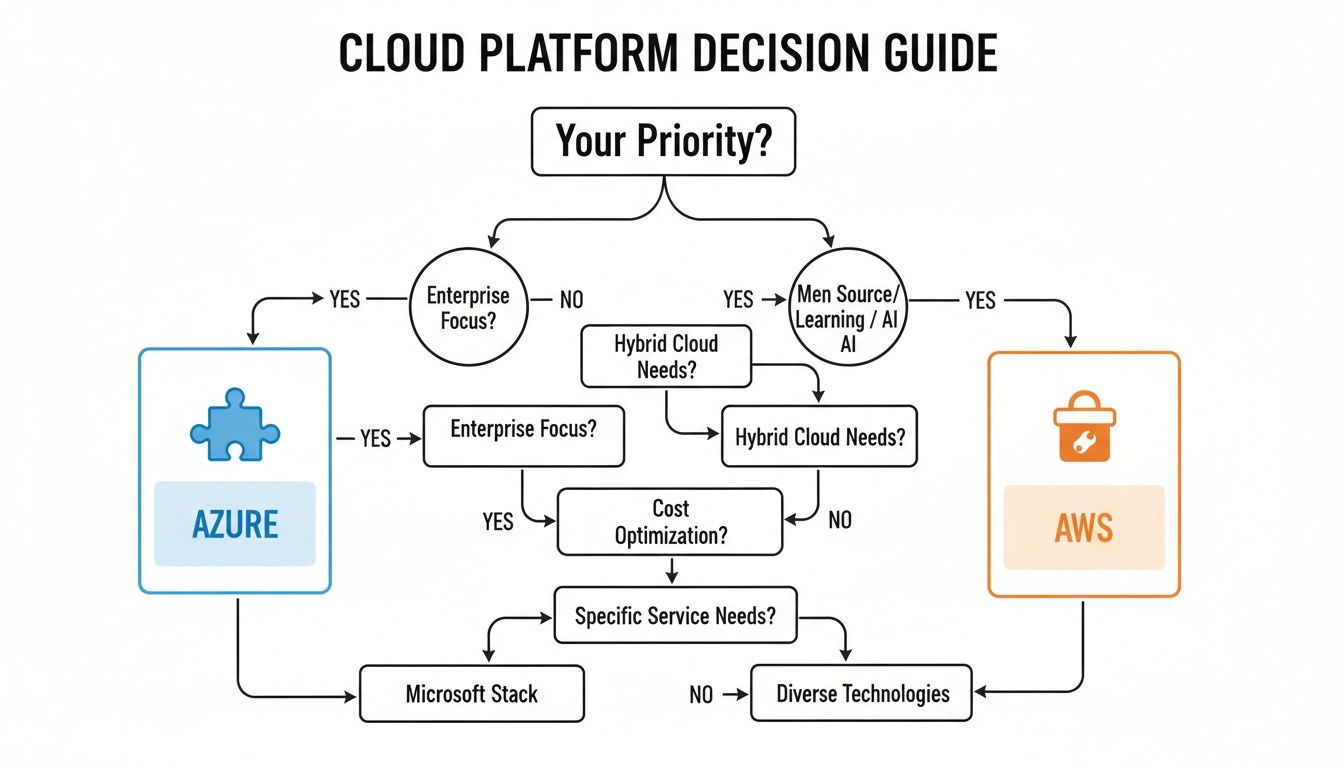
If your priority is deep enterprise integration and a strong hybrid story, Azure is often the logical path. If you need the broadest set of mature services available, AWS is the clear choice.
Workload-Specific Recommendations
Different applications have different architectural needs. Let's break down how the Azure vs AWS comparison plays out for common business workloads.
High-Growth SaaS And E-commerce Platforms
For startups and digital-native businesses, speed and agility are paramount.
Recommendation: AWS
AWS's mature, extensive, and well-documented suite of services makes it the default choice for building scalable, cloud-native applications. The huge ecosystem of third-party tools, a massive talent pool, and services like AWS Lambda for serverless computing enable teams to iterate and deploy incredibly fast.
Enterprise Data Analytics And AI
Enterprises are focused on turning massive data stores into actionable intelligence.
Recommendation: Azure
While both platforms have powerful AI/ML capabilities, Azure’s co-engineered relationship with Databricks gives it a distinct performance edge. Recent benchmarks have shown Azure Databricks can be up to 21.1% faster than its AWS counterpart. Combined with native integrations into Power BI and Microsoft Fabric, Azure creates a more unified and efficient data ecosystem. Our DevOps as a Service offering can help streamline these complex data operations.
Fintech And Regulated Financial Services
For fintech, security, compliance, and identity management are non-negotiable.
Recommendation: Azure
Azure's deep integration with Microsoft Entra ID (formerly Azure AD) is a game-changer for financial institutions that already rely on Microsoft for identity. This creates a seamless security perimeter that extends from on-premises infrastructure to the cloud, simplifying governance and reducing risk. This native identity fabric is a powerful differentiator that AWS struggles to match in a traditional enterprise setting.
Summary and Next Steps
Making the final call between Azure vs AWS is a significant strategic decision. The right choice aligns your technology with your business goals, creating a foundation for future growth.
Your immediate next steps should be:
- Conduct a TCO Analysis: Use the official calculators from both providers, but be sure to factor in often-overlooked costs like data egress, premium support, and potential software licensing savings like the Azure Hybrid Benefit.
- Run a Proof of Concept (POC): Take a representative workload and build it out on both platforms. This provides invaluable, real-world data on performance, ease of use, and operational overhead.
- Evaluate Partner Ecosystems: Consider the availability of managed service providers, consultants, and third-party tools for each platform. A strong partner can accelerate your cloud journey and help you avoid common mistakes.
Frequently Asked Questions
When deciding between Azure vs. AWS, a few key questions consistently arise. Here are straight, practical answers to what we hear most often from tech leaders.
Which Is Cheaper For A Small Business Or Startup?
The answer depends on your existing network and what you plan to build.
AWS often gets the nod for new companies. Its free tier is generous and well-documented, making it a fantastic sandbox for experimentation without immediate costs.
However, if you're connected to programs like the Microsoft for Startups Founders Hub, Azure can be a game-changer. The program provides significant Azure credits, free GitHub Enterprise, and hands-on technical support, which can seriously reduce your burn rate in the critical early days.
How Difficult Is It To Migrate From On-Premises To Each Cloud?
The difficulty of a migration depends on your current on-premise setup.
-
Azure: If your data center runs on Windows Server, SQL Server, and Active Directory, moving to Azure is a natural next step. Tools like Azure Migrate are built for this environment, and the Azure Hybrid Benefit makes it financially attractive.
-
AWS: Migrating a Microsoft-heavy environment to AWS is possible but usually involves more re-architecting. AWS has solid tools like the Application Migration Service (MGN), but you won't get the seamless integration or licensing perks that Azure offers for a Microsoft shop.
Key Takeaway: If your company's DNA is Microsoft, the path to Azure is smoother and more cost-effective. For organizations running diverse, open-source stacks, AWS is often the more straightforward choice where native integration isn't a deciding factor.
Is One Cloud Better For A Specific Programming Language Like .NET or Python?
Both platforms support virtually any language, but their native tooling favors certain stacks.
Azure is undoubtedly the home turf for .NET development. The deep integration with Visual Studio, Azure DevOps, and services like App Service creates an incredibly fluid development cycle for C# and F# engineers.
Historically, AWS was the go-to for Python, Java, and the open-source community. However, Azure has invested heavily in its open-source support, and the experience for a Python developer using Azure Functions or Azure AI is now top-notch. Today, the decision is less about language support and more about which platform’s tooling best fits your team’s workflow.
At Group 107, we provide the strategic guidance and hands-on engineering expertise to help you choose the right cloud and execute a seamless migration. Let us help you build a cloud foundation that is scalable, secure, and cost-effective.
Learn more about how we build powerful digital solutions at https://group107.com.